
Industrial plant at dusk

Plan the workweek. Hold it when the plant changes.

PaSTA is workweek management software for utilities, power generation, transmission and distribution, and oil and gas. It works alongside SAP or Maximo as a front end for the week: pull in the backlog, schedule by crew, craft or person, and flex with the work as it moves. MoPaSTA carries the week out to the crews in the field.

The workweek at a plant does not hold still

Work orders change daily. Outage scope changes by the hour. Much of the work does not run in sequence, so a bar on a Gantt chart is not close enough, and a single template cannot fit every crew, craft and site.

When the plan cannot keep up, the gaps get patched by hand. Teams end up living in spreadsheets, scheduling reactively, and losing hours they could have spent on planned work.

PaSTA was built for that week. It follows the EPRI Work Week Management guidelines and gives planners one place to build the week, rework it when the plant changes, and see whether it is holding.

What usually gets patched by hand

  • Backlog tracked in one place and the weekly plan built in another.
  • Break-in and emergent work squeezed in without a record of why the week moved.
  • Crew availability kept in a supervisor’s head or a side spreadsheet.
  • Field status captured on paper and re-entered later, or not at all.

PaSTA runs the workweek

One planning environment for the whole week, built on the work orders you already have.

  1. 1

    Build the week from work you already have

    Work orders come from your maintenance system. Planners pull them from the backlog, prioritize against plant need, and assign them to the week.

  2. 2

    Schedule by crew, craft or person

    Drag and drop work onto people and days, on net available hours rather than headcount.

  3. 3

    Rework it without rebuilding it

    Conflicts and openings show up as the plant changes, so the week can be re-sequenced while there is still time to act.
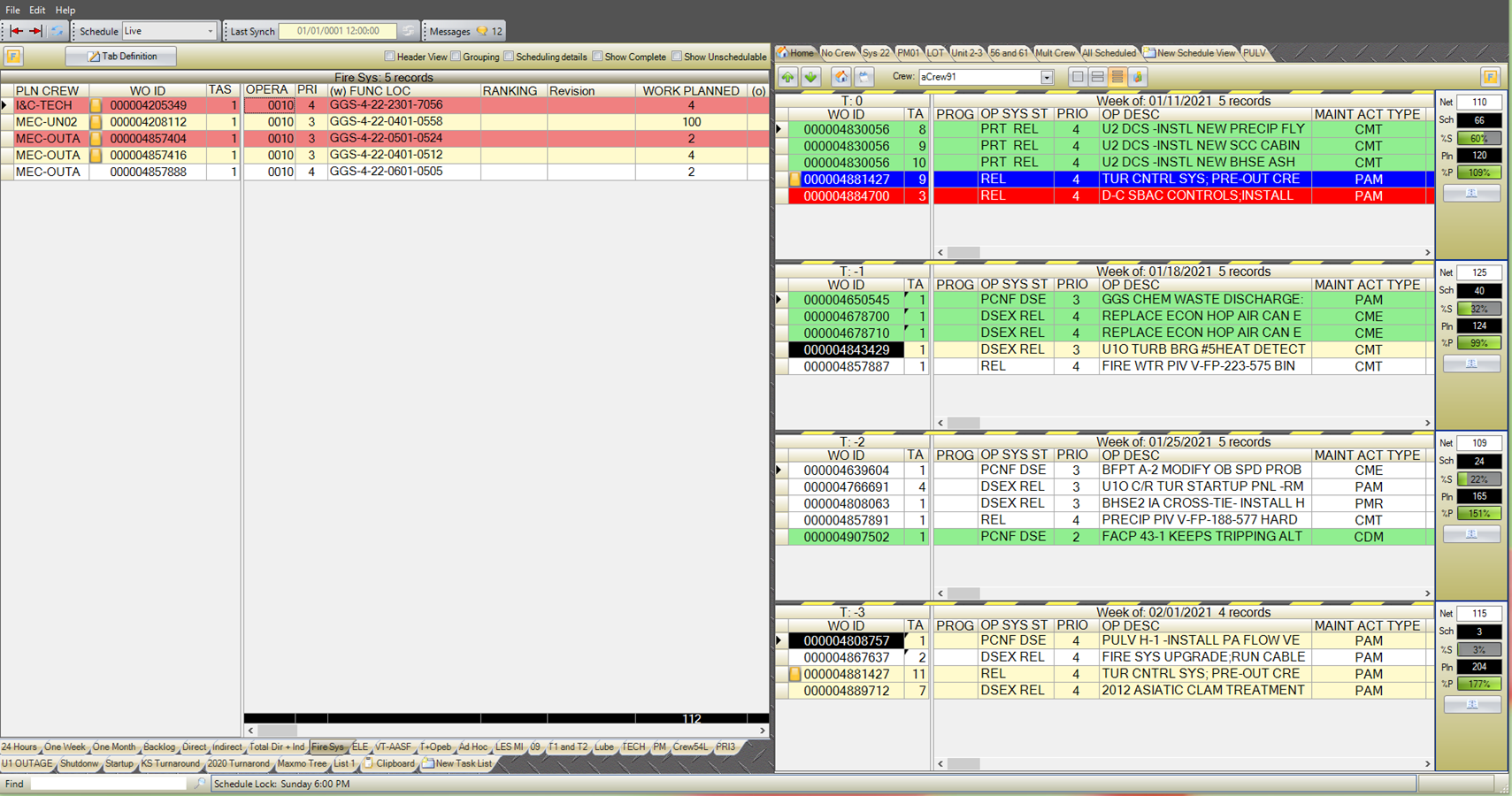

PaSTA Work Week Assignment screen showing four workweeks with live schedule metrics
Work Week Assignment: four workweeks at once, T0 back to T-3, with live metrics beside each.

What PaSTA does

Six capabilities bring building, managing and executing the week into one planning environment.

Workweek assignment

Pull in the backlog, prioritize against plant need, and assign work to the week, weeks ahead of execution.

Workweek scheduling

Weekly and daily schedules by drag and drop. Move one job or a whole week’s schedule at once.

Resource coordination

Match people, skills and equipment to the work, and see conflicts before the crew does.

Daily planning

Work the day hour by hour without losing the shape of the week.

Real-time visibility

Schedule health against live KPIs, plus configurable ad hoc reports, while there is still time to act on them.

Execution and closeout

Progress and closeout from the field carried back to the schedule, with a reason recorded when work rolls to another week.

Crew gathered for a briefing before work begins

The right person, on the right job, at the right time

Planned weeks out, reworked the moment the plant requires it, and closed out where the work happens.

A layer on the systems you already run

PaSTA does not replace your CMMS. It wraps around SAP or Maximo as a front end for the week, then hands the schedule back.

  1. 1

    Your CMMS

    SAP or Maximo defines scope, sets priorities and creates the work orders.

  2. 2

    PaSTA builds the week

    Work is assigned by crew, craft and person, weeks out, and reworked as plant conditions change.

  3. 3

    Crews do the work

    Every worker knows what to do and when. MoPaSTA puts the current week on a phone or tablet.

  4. 4

    Status goes back

    Progress and closeout return to your system of record, which stays the system of record.

A lightweight layer, not a rip and replace. There is no CMMS migration, your SAP or Maximo configuration stays as it is, and PaSTA adds no new point of failure to your outage schedule.

PaSTA, where your teams work

The same workweek, reached from the desk, the browser or the field, with the pieces that connect it to the rest of the operation.

PaSTA

The core workweek platform for planners and schedulers: assignment, scheduling, metrics and reporting.

WebPaSTA

Browser access to the workweek, for supervisors and planners who should not need a desktop install to see it.

MoPaSTA

Mobile PaSTA for the crews. Update, create, approve and close work from the field, on or offline, with uploads to SAP or Maximo.

CICS

Custom forms for the work-order side. Create and approve notifications, plan labor and materials, and close work out, so the data lands clean in your CMMS and scope is not maintained twice.

OPEX360

Performance visibility above the individual week, across crews and sites, so trends surface before they become problems.

Hosting

Run PaSTA on your own infrastructure, or have FOCUS host and manage it for you.

The teams already running it

We were constantly fighting the reactive work that would drown us. Now, with PaSTA, we find that we are getting more of the right work done with the efficient use of our labor resources and are no longer living in that reactive world.

Ken GaudreauManager, Materials & Technology, SCANA

It has been over a year since we implemented PaSTA within the Wind Fleet and already we have gone from 80% reactive to 70% and in some cases 60% reactive, which in turn means technicians are turning the wrench more.

Marv BaxterManager, Work Management, NRG

All technicians have advanced knowledge of upcoming assignments and engage in preparing work. This has resulted in efficiencies even with limited resources.

Jerry BrownWork Management & Generation Asset Manager, NPPD

Who is qualified? Who is scheduled?

Two questions get asked about the same worker on the same day. FOCUS Learning has answered the first since 1985. PaSTA answers the second.

VISION and Qlarity: who is qualified

  • The task list for each role, kept current
  • Who is qualified for which task, and on what evidence
  • When each qualification comes due
  • The training and evaluation record an auditor asks for

VISION for nuclear operators. Qlarity for electric utilities and other regulated industries.

PaSTA: who is scheduled, and when

  • The backlog and the work chosen for each week
  • Which crew, craft and person is on each job
  • What moved during the week, and why
  • Progress and closeout from the field

Where the two meet in a normal week

  • Planners staff the week weeks out, so they need to know who is current for the work.
  • A qualification that comes due inside the week matters to both teams before the week locks.
  • Rarely performed work showing up on the schedule is when a refresher helps most.
  • Break-in work reassigns a job at short notice, and the person picking it up still has to be current.

Proves they can. Proves they did.

The training record in VISION or Qlarity shows a worker was qualified for the task. The work record shows the task was done, by whom and when. Sooner or later, a regulator or an internal review asks for both.

They are separate products with separate jobs, and PaSTA stands on its own. What changed is that one partner now understands both sides, so a question that crosses from training into planning has one place to go.

What that means for you

  • PaSTA is bought, deployed and supported on its own. You do not need VISION or Qlarity to run it.
  • If you already run VISION or Qlarity, the team that supports your training program can now help with the workweek too.
  • The planning and scheduling expertise behind PaSTA is part of FOCUS Learning.

PaSTA, in short

The questions that come up first. If yours is not here, ask us directly.

What is PaSTA?

PaSTA is workweek management software for utilities, power generation, transmission and distribution, and oil and gas. Planners use it to build the week from the backlog, schedule it by crew, craft or person, and rework it as the plant changes, with live metrics on how the week is holding.

Does PaSTA replace SAP or Maximo?

No. PaSTA works alongside those systems as a front end for the workweek. Work orders come from your CMMS, PaSTA builds the week around them, and status goes back. Your system of record does not change, and there is no data migration off it.

What are MoPaSTA and CICS?

MoPaSTA is mobile PaSTA: the current week on a phone or tablet, so crews can update and close work from the field, on or offline. CICS is a set of custom forms for creating, approving and closing work orders, so the data that reaches your CMMS is consistent.

Are PaSTA and VISION or Qlarity integrated?

No. They are separate products serving separate workflows, and each is bought, deployed and supported on its own. What they share is FOCUS Learning as the partner behind them.

Who at our organization should evaluate PaSTA?

The Workweek Manager first, alongside maintenance planning and scheduling, operations and outage leadership, with IT involved on deployment and the interface to your CMMS. It is usually a different team from the one that owns training.

Has PaSTA been renamed?

No. PaSTA and MoPaSTA keep their names. Nothing changes what a customer logs into or what they call it.

Where did PaSTA come from?

PaSTA and MoPaSTA were built by P&RO Solutions, which became part of FOCUS Learning on 31 July 2026. They are now FOCUS Learning products, with the same people behind them.

See PaSTA against your own workweek

Tell us how the week gets built today, from the backlog to the field. We will walk through what PaSTA would change for your planners and crews, using your own work rather than a demo script.


Utility field technicians reviewing work on a tablet